
Graph OnlineOnline Graph Editor
Graph Online
The modern graph editor forrelationship data.
Create, visualize, and connect everything.
Infinite canvas. Intelligent layout.
AI-assisted.
Business Network

Organizational Structure

Process Flow

Knowledge Graph

Dependencies

AI Assist Extract entities Build relations Create node templates
100%
What it does
A canvas built for nodes, links, data, and layouts.
Graph Online is not a generic whiteboard. It is a graph editing workspace where the visual diagram remains connected to structured relationship data.
01
Editable relationship diagrams
Create nodes, connect relationship lines, edit labels, colors, groups, line styles, and data fields directly in the browser.
02
Dozens of automatic layouts
Use automatic layouts to turn messy networks into readable structures without manually placing every node.
03
Multiple data inputs
Start from Mermaid, templates, natural-language prompts, or planned attachment extraction from Excel, CSV, PDF, Word, images, TXT, and JSON.
04
Reusable node templates
Use structured node cards for people, projects, assets, metrics, and domain-specific states instead of simple boxes.
05
AI-created custom nodes
Describe style, data structure, or interactive component needs in natural language and reuse the generated template across documents.
06
Document management
Keep graph work as documents with sharing, permissions, version history, and export to image, PDF, and JSON.
Workflow
From messy information to an editable relationship document.
Graph Online is designed around a practical flow: bring data in, generate or build the graph, then keep editing it as a living document.
01
Bring information in
Use Mermaid, templates, manual editing, AI prompts, planned file extraction, or planned web research.
02
Generate and structure
Turn entities, relationships, fields, and intent into a graph that can be opened and edited immediately.
03
Layout and refine
Apply automatic layouts, tune labels and line styles, edit node fields, and adjust visual hierarchy.
04
Share and maintain
Save the result as a document, manage versions and permissions, then export when needed.
Templates and nodes
Nodes can be real business components, not just boxes.
Graph Online node templates can carry content structure and visual design. A node can become a person card, KPI card, status badge, asset block, or interactive domain component.
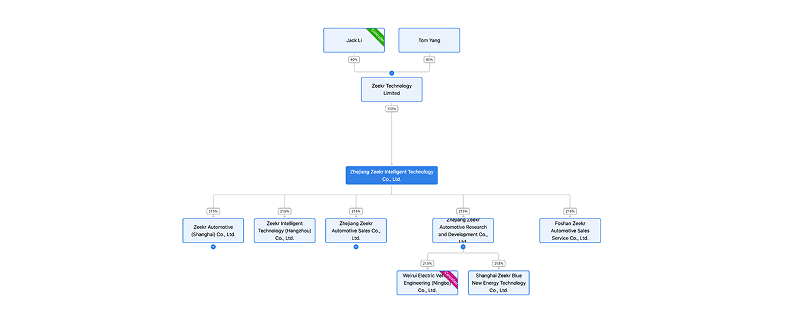
Content-rich node cards
Show avatars, roles, departments, owners, metrics, status, descriptions, and editable fields inside graph nodes.
Create your own node types
Describe the template you need once, then reuse it across graph documents.
Start from common structures
Build organization charts, equity maps, people networks, workflows, dependency maps, and knowledge graphs faster.
Graph documents
Keep diagrams editable after generation.
Graph Online turns generated or manually created diagrams into documents. They can be opened later, edited again, shared, governed with permissions, and exported for reporting or integration.
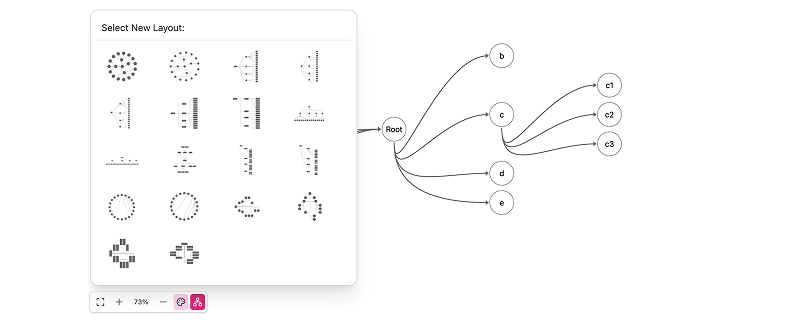
Built for relation-graph
Export relation-graph visuals into Graph Online.
Graphs rendered by relation-graph can be exported into Graph Online. Nodes, links, and visual styles can be preserved as much as possible, then edited further as online graph documents.
Generate graph documents from graph appsEnterprise
Custom graph editing workflows for teams and systems.
For enterprise scenarios, Graph Online can support private deployment, API integration, embedded usage, custom node templates, business data workflows, and permission-system adaptation.
Private deployment
Deploy Graph Online in controlled environments for sensitive relationship data.
API and embedding
Integrate graph document creation, editing, or display into internal systems.
Custom workflows
Adapt templates, permissions, document flows, and data inputs around business scenarios.